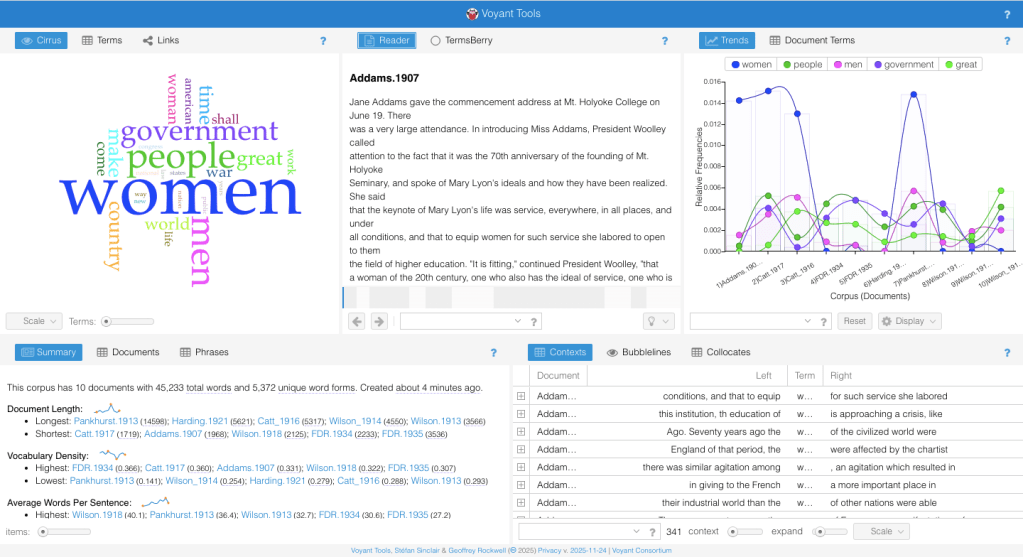
Here is the trends tool, which is the second section I started to play with. Here, you can see a few things I did wrong. First, the inconsistent naming of my documents makes it difficult to know, for people other than me, which documents are which! Even for me, after a while of doing this work, I am pretty confident I would get the names mixed up. Once I got to this point, I started to realize I needed to organize my data better.
It’s Okay To Start Again!
The trends tool cannot be used here to its fullest potential because of the way I separated each speech into its own text. This means it is analyzing individual speeches, instead of sections of the corpus (or the ENTIRE data) that I wanted to see. I realized what I was really interested in was the differences between the State of the Union Speeches and the Suffragettes holistically, not individually. This meant the better organization of my data, and I found two large documents, making my corpus only two-pronged, not ten. I used the same speeches and pasted them into my text editor (on a Mac, or the notebook application on Windows) in chronological order. This allowed me to see the change over time as well, and have one significant document with all of the same “type” of speech I am identifying. Once I had both corpora ready and pasted into two documents, I multiselected those documents within the “Upload” section of Voyant to enter my results.
I had to fix the way that I entered my data- but that’s okay! It’s normal for digital projects to hit hiccups, and with careful data practices, you can decrease the number of times you’ll run into issues like mine. That’s why you started with “Corpus preparation” as your first step. With what we’ve learned together, let’s see how my new organization of data came out below!
 Voyant Text Guide for Students